Mergify Conditions
Everything you need to know when writing conditions in Mergify
A condition is a boolean expression evaluated against a pull request’s attributes to determine whether a rule applies.
Structure of a Condition
Section titled Structure of a ConditionThe grammar for a condition is:
[ "-" ] [ "#" ] <attribute> [ <operator> <value> ]
Modifiers
Section titled Modifiers- The optional minus (
-) prefix negates the condition (“not”). - The optional hash (
#) prefix evaluates the length of a list attribute.
Attributes
Section titled AttributesAttributes represent properties of a pull request: number of approvals, labels, status of CI checks, and so on.
Operators
Section titled OperatorsWhen the attribute is a list, comparison operators behave as if “any” is used on the list: the condition is true if any element matches.
# True if any check named `test` succeeds.- check-success = test# True if any modified file starts with foo/- files ~= ^foo/Values
Section titled ValuesValues can be strings, numbers, or Booleans, depending on the attribute.
For example:
#approved-reviews-by >= 2
- Attribute:
approved-reviews-by(list of approved reviewers). - Operator:
>=. - Value:
2. - The
#prefix evaluates the length of the list.
Boolean attributes are used on their own or negated with -:
# True if the PR is merged- merged# True if the PR is open- -closedAttributes List
Section titled Attributes List| Attribute name | Value type | Description |
|---|---|---|
added-files | list of string |
The files that are added by the pull request. |
added-lines | list of string |
The lines that are added by the pull request. Only usable as |
approved-reviews-by | list of string |
The list of GitHub user or team login that approved the pull request. Team logins are prefixed with the |
assignee | list of string |
The list of GitHub user or team login that are assigned to the pull request. Team logins are prefixed with the |
author | string |
The GitHub user or team login of the author of the pull request. |
base | string |
The name of the branch the pull request should be pulled into. |
body | string |
The content of the pull request description without Markdown/HTML comments. |
body-raw | string |
The content of the pull request description. |
branch-protection-review-decision | APPROVED, CHANGES_REQUESTED or REVIEW_REQUIRED or null |
The review decision. This indicates if |
changes-requested-reviews-by | list of string |
The list of GitHub user or team login that have requested changes in a review for the pull request. |
check | list of string |
The list of checks for that pull request. |
check-failure | list of string |
The list of checks that failed for the pull request. Checks that report being cancelled, timed out, and action required are also considered as failures. |
check-neutral | list of string |
The list of checks that are neutral for the pull request. |
check-pending | list of string |
The list of checks that are pending for the pull request. |
check-skipped | list of string |
The list of checks that was skipped for the pull request. |
check-stale | list of string |
The list of checks that are stale for the pull request. |
check-success | list of string |
The list of checks that successfully passed for the pull request. |
check-timed-out | list of string |
The list of checks that timed out for the pull request. |
closed | boolean |
Whether the pull request is closed. |
closed-at | date-time or null |
The time the pull request was closed at. |
co-authors | list of CommitAuthor |
The list of co-authors on the pull request (excluding merge commits and bots). |
commented-reviews-by | list of string |
The list of GitHub user that have commented in a review for the pull request. This only matches reviewers with |
commits | list of Commit |
The list of commits of the pull request. The index 0 is the first commit, while -1 is the last commit. |
commits-behind | list of string |
The list of commits between the head of the base branch and the base of the pull request. This can only be used with the length operator as |
commits-unverified | list of string |
The list of commit messages that are marked as unverified by GitHub. |
conflict | boolean |
Whether the pull request is conflicting with its base branch. |
created-at | date-time |
The time the pull request was created at. |
current-datetime | date-time |
The current date and time. |
deleted-lines | list of string |
The lines that are deleted by the pull request. Only usable as |
dependabot-dependency-name | list of string |
The dependency-name value included in the Dependabot commit message. |
dependabot-dependency-type | list of string |
The dependency-type value included in the Dependabot commit message. |
dependabot-update-type | list of string |
The update-type value included in the Dependabot commit message. |
depends-on | list of string |
The list of dependencies to other pull request in the format |
deployment-failure | list of string |
The list of deployments that failed for the pull request. |
deployment-success | list of string |
The list of deployments that successfully passed for the pull request. |
dismissed-reviews-by | list of string |
The list of GitHub user login that have their review dismissed in the pull request. |
draft | boolean |
Whether the pull request is in draft state. |
files | list of string |
The files that are modified, deleted or added by the pull request. |
head | string |
The name of the branch where the pull request changes are implemented. |
head-repo-full-name | string |
The head branch repository full name (complete version with the organization name). |
label | list of string |
The list of labels of the pull request. |
linear-history | boolean |
Whether the pull request commits history is linear (no merge commit). |
locked | boolean |
Whether the pull request is locked. |
merge-commit-sha | string or null |
The merge commit SHA of the pull request returned by GitHub. |
merged | boolean |
Whether the pull request is merged. |
merged-at | date-time or null |
The time the pull request was merged at. |
merged-by | string or null |
The GitHub user that merged the pull request. |
mergify-configuration-changed | boolean |
Whether the pull request contains changes in the configuration file. |
milestone | string or null |
The milestone title associated to the pull request. |
modified-files | list of string |
The files that are modified by the pull request. |
modified-lines | list of string |
The lines that are modified by the pull request. Only usable as |
number | integer |
The pull request number. |
queue-dequeue-reason | NONE, PR_MERGED or PR_MERGED_INTERMEDIATE_RESULTS_SKIPPED, PR_DEQUEUED, PR_DEQUEUED_FROM_PARTITION, PR_AHEAD_DEQUEUED, BATCH_AHEAD_FAILED, PR_WITH_HIGHER_PRIORITY_QUEUED, SCHEDULED_FREEZE_STATUS_CHANGED, SPECULATIVE_CHECK_NUMBER_REDUCED, CHECKS_TIMEOUT, CHECKS_FAILED, QUEUE_RULE_MISSING, BASE_BRANCH_MISSING, BASE_BRANCH_CHANGED, PR_UNEXPECTEDLY_FAILED_TO_MERGE, BATCH_MAX_FAILURE_RESOLUTION_ATTEMPTS, PR_CHECKS_STOPPED_BECAUSE_MERGE_QUEUE_PAUSE, CONFLICT_WITH_BASE_BRANCH, CONFLICT_WITH_PULL_AHEAD, BRANCH_UPDATE_FAILED, DRAFT_PULL_REQUEST_CHANGED, PULL_REQUEST_UPDATED, MERGE_QUEUE_RESET, INCOMPATIBILITY_WITH_BRANCH_PROTECTIONS, PR_MANUALLY_MERGED, DRAFT_PULL_REQUEST_CREATION_FAILED, DRAFT_PULL_REQUEST_CREATION_BRANCH_NOT_INDEXED, CONFIGURATION_CHANGED, UNPROCESSABLE_PULL_REQUEST, PR_MANUALLY_DEQUEUED, STACK_PREDECESSOR_DEQUEUED, INTERMEDIATE_RESULTS_SKIPPED or CHECKS_RETRIED or null |
A dequeue code for when a pull request has been disembarked from the merge queue. |
queue-merge-started-at | date-time or null |
The time the pull request mergeability checks have started at. |
queue-name | string or null |
The name of the queue containing the pull request. |
queue-position | integer |
The position of the pull request in its queue if queued. The first pull request in the queue has position 0. The value is set to -1 if the pull request is not queued. |
queued-at | date-time or null |
The time the pull request was queued at for merge. |
removed-files | list of string |
The files that are removed by the pull request. |
repository-full-name | string |
The current repository full name (complete version with the organization name). |
repository-name | string |
The current repository name (short version without the organization name). |
review-requested | list of string |
The list of GitHub user or team login that were requested to review the pull request. Team logins are prefixed with the @ character. This only matches reviewers with |
review-threads-resolved | list of string |
The list of ids associated to review threads that are marked as resolved by GitHub. |
review-threads-unresolved | list of string |
The list of ids associated to review threads that are NOT marked as resolved by GitHub. |
schedule | string |
The current time will be compared against this schedule to validate this attribute. |
scope | list of string |
The list of scopes associated with the pull request for merge queue batching. |
sender | string |
The GitHub login of the command author. |
sender-permission | GitHubRepositoryPermission |
The permission of the command author. |
title | string |
The title of the pull request. |
updated-at | date-time |
The time the pull request was updated at. |
updates | list of PullRequestHeadShaHistoryDict |
The list of updates done on an opened pull request. |
Operators List
Section titled Operators List| Operator Name | Symbols | Description |
|---|---|---|
| Equal |
| This operator checks for strict equality. If the target attribute type is a list, each element of the list is compared against the value and the condition is true if any value matches. |
| Not Equal |
| This operator checks for non equality. If the target attribute type is a list, each element of the list is compared against the value and the condition is true if no value matches. |
| Match |
| This operator checks for regular expressions matching. If the target attribute type is a list, each element of the list is matched against the value and the condition is true if any value matches. |
| Glob |
| This operator checks for matching path using Unix-style pathname pattern expansion. If the target attribute type is a list, each element of the list is matched against the value and the condition is true if any value matches. |
| Greater Than or Equal |
| This operator checks for the value to be greater than or equal to the
provided value. It’s usually used to compare against the length of a
list using the # prefix. |
| Greater Than |
| This operator checks for the value to be greater than the provided
value. It’s usually used to compare against the length of a list using
the # prefix. |
| Lesser Than or Equal |
| This operator checks for the value to be lesser then or equal to the
provided value. It’s usually used to compare against the length of a
list using the # prefix. |
| Lesser Than |
| This operator checks for the value to be lesser than the provided value. It’s
usually used to compare against the length of a list using the |
Operators on Lists
Section titled Operators on ListsMost operators iterate over list attributes and return true if any value matches.
For a pull request with labels (bug, work-in-progress):
label = work-in-progressis true.label = enhancementis false.label != work-in-progressis false.label ~= ^workis true.-label ~= ^workis false (negated with-).
Examples with Operators
Section titled Examples with Operators# Match a specific milestone- milestone = v1.0
# Fewer than 50 files changed- "#files <= 50"
# Label is not "bug"- label != bugCombining Conditions Using Logical Operators
Section titled Combining Conditions Using Logical OperatorsCombine conditions with and, or, and not.
The and Operator
Section titled The and OperatorConditions on separate lines within the same rule are implicitly joined by
and. The and keyword can also be used explicitly to group conditions.
name: Require reviews and CIif: - base = mainsuccess_conditions: - and: - "#approved-reviews-by >= 2" - "check-success = test job"The or Operator
Section titled The or Operatorname: Require reviews or passing CIif: - base = mainsuccess_conditions: - or: - "#approved-reviews-by >= 2" - "check-success = test job"The not Operator
Section titled The not Operatornot negates a block of conditions, typically wrapping an and or or.
name: Block merges missing requirementsif: - base = mainsuccess_conditions: - not: and: - "#approved-reviews-by >= 2" - "check-success = test job"Testing and Debugging Conditions
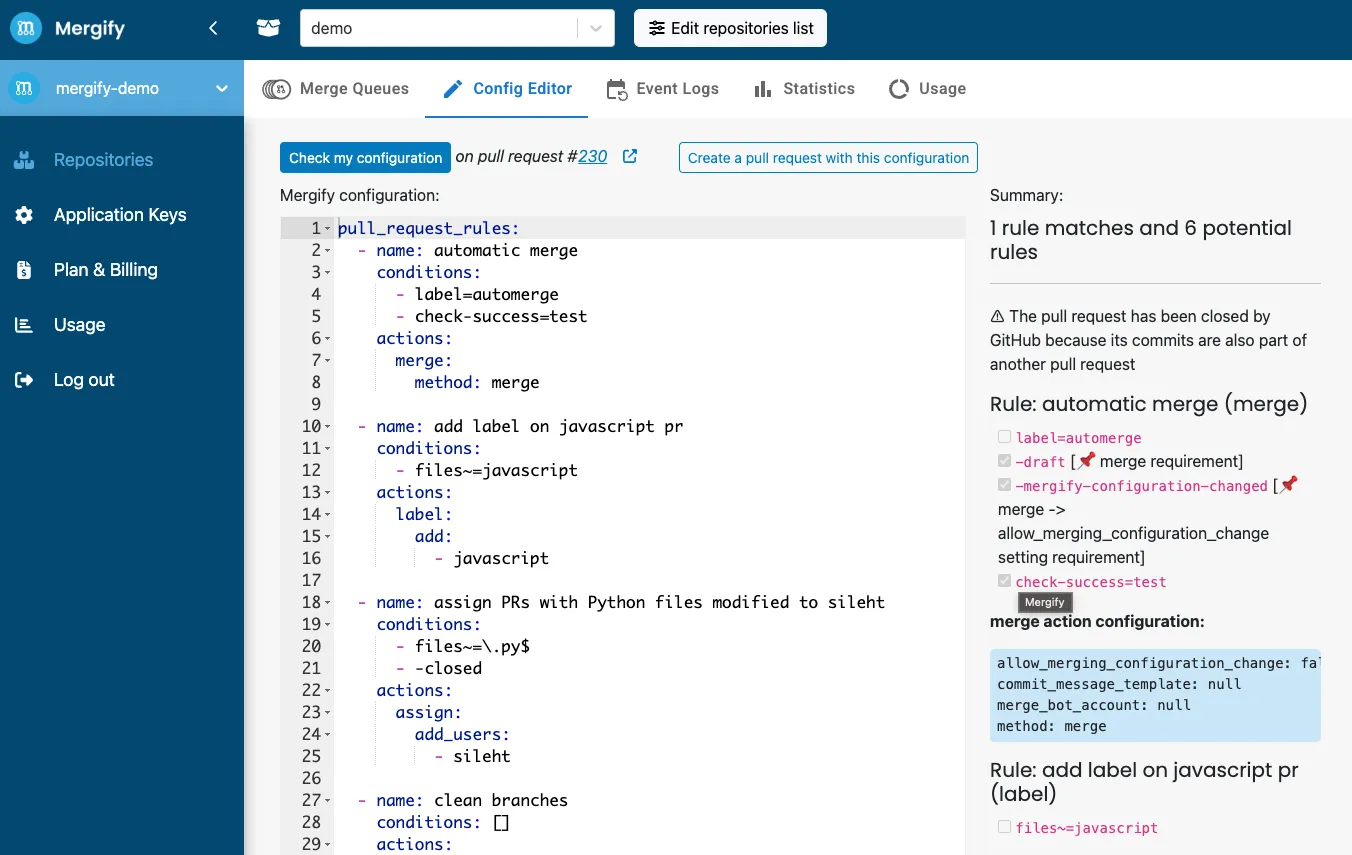
Section titled Testing and Debugging ConditionsUse the Mergify Configuration Editor
Section titled Use the Mergify Configuration EditorThe configuration editor evaluates your conditions against existing pull requests without triggering actions.
- Navigate to your Mergify dashboard.
- Select the repository you want to test.
- Click on the “Config Editor” tab.
Analyze the Mergify Checks
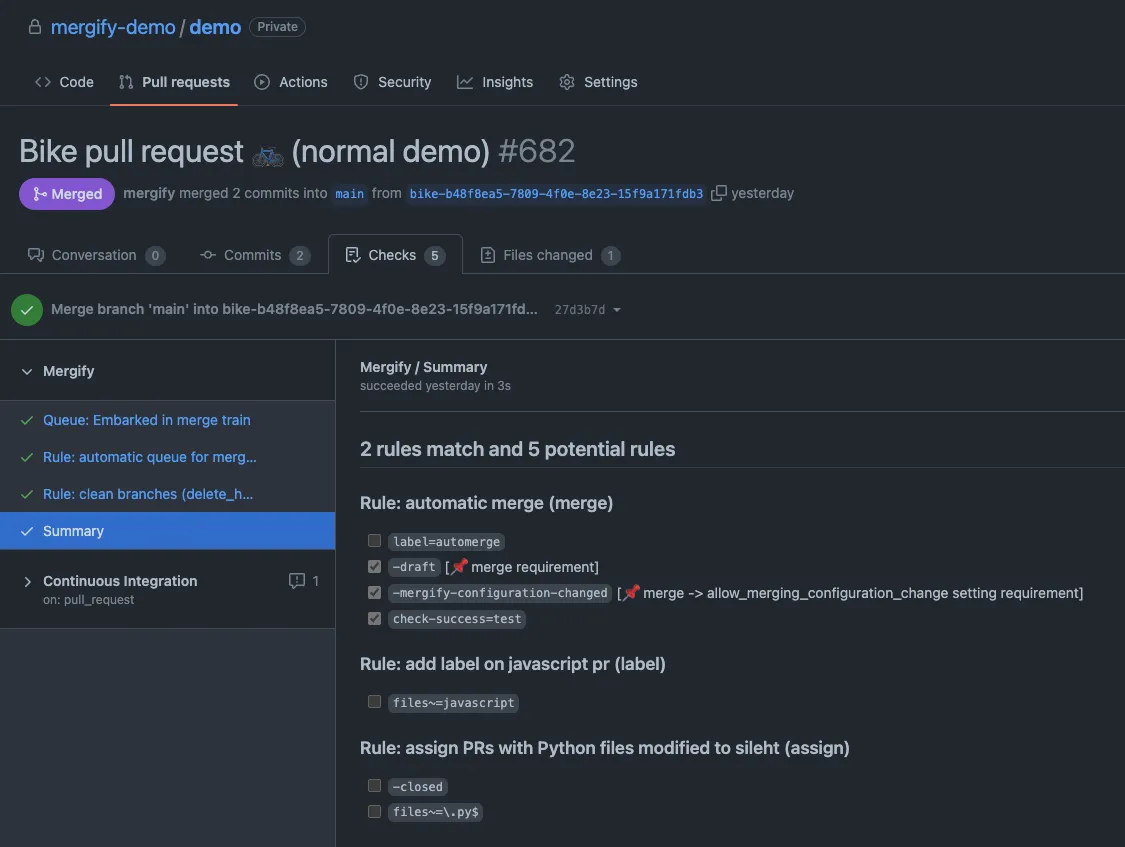
Section titled Analyze the Mergify ChecksOnce your configuration is committed, Mergify evaluates conditions for each pull request. To inspect the evaluation:
- Navigate to the “Checks” tab of the pull request.
- Look for the “Mergify” check in the list of checks.
- Click on “Summary” to view the detailed Mergify report.
The report shows which rules were evaluated and whether each condition was met.
Was this page helpful?
Thanks for your feedback!